Most probably you've already heard about firebug, if you haven't, I really recommend you go give it a spin right now.
Basically, firebug let's you lift the hood in your browser and see pretty much everything that's happening in there. It lets you edit, and monitor all HTML, CSS, Javascript live in any web page - it even lets you edit those objects on the fly!
It also gives you a fantastic console that lets you expose information about what's flowing through your scripts. Adding a global variable named "console" it exposes many methods that allow you to write to the Firebug console.
The really cool thing is that from flash you can call "console" using ExternalInterface, and any object you pass will be dumped as if it was a javascript object.
try it out, go:
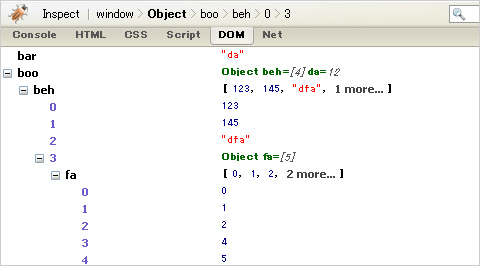
ExternalInterface.call("console.log",{foo:123,bar:"da",boo:{da:12,beh:[123,145,"dfa",{fa:[0,1,2,4,5]}]}});
and you will see the output in the image above.
To save you some time and make things cleaner, here you will find an AS3 Class that exposes the console object to any of your Actionscript/flex applications.
All methods are static so you don't need to instantiate the class.
From actionscript, all you need to do now is:
Console.log({foo:123,bar:"da",boo:{da:12,beh:[123,145,"dfa",{fa:[0,1,2,4,5]}]}});
I guess the only drawback for this is that this will bong out if you are trying to dump an object with circular references, or your object is too big. - I can't find out what's the size limit right now, but I've seen it throwing an exception when the objects I passed where too complex.
In case you need something more robust to debug your code, then I really recommend you try out FlexBuilder's debugger.
download: Console.as
